

You built a product, launched it on Amazon, and somewhere along the way your catalog became a mess. The same item is showing up twice. Reviews are scattered. Traffic is split. And your ranking is suffering because of it. Sound familiar? If yes, you need to learn how to merge Amazon listings the right way and you need to do it without risking your sales history or suppressing your ASIN.
This comprehensive guide by CaptenAMZ an Amazon catalog management agency trusted by brands across the USA (NJ, NYC, TX, California), the UK, and European markets walks you through every step of the listing merge process, common pitfalls, expert strategies, and when to call in professionals. Whether you are a solo seller in New Jersey or a scaling brand in London, the principles are the same: a clean, merged Amazon catalog is a profitable one.
1. What Does It Mean to Merge Amazon Listings?
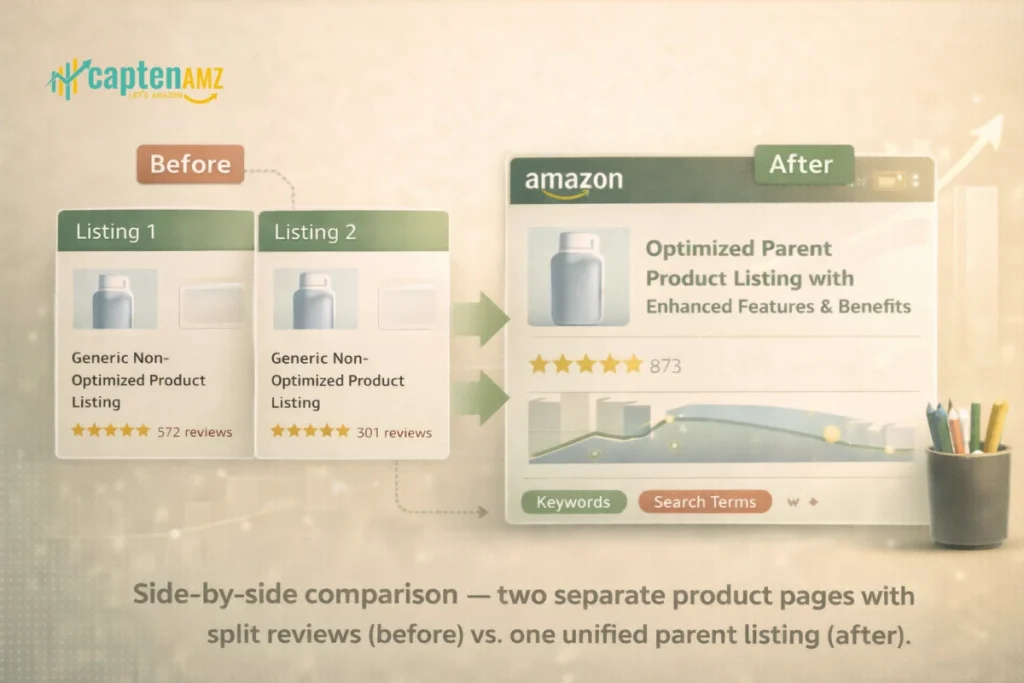
Merging Amazon listings means combining two or more separate product detail pages into a single, unified listing. This process eliminates duplicate ASINs, consolidates customer reviews, and directs all organic traffic to one authoritative product page.
There are two primary scenarios where sellers need to merge listings:
- Duplicate ASINs: The exact same product was listed more than once under different ASINs — often due to bulk upload errors, multiple sellers creating separate pages, or catalog errors by Amazon itself.
- Fragmented Variations: Different sizes, colors, or styles of the same product exist as separate standalone listings instead of being grouped under one parent-child variation family.
| CaptenAMZ Expert Insight Merging is not just a housekeeping task. At CaptenAMZ, we have seen brands recover 30–60% of lost organic ranking simply by consolidating fragmented catalogs. Your merged listing fights with one strong voice instead of several weak ones. |
2. Why You Should Merge Amazon Listings (The Real ROI Impact)
Before diving into the how, let’s address the why — because many sellers underestimate the revenue damage caused by unmerged listings. Here is what a fragmented catalog actually costs you:
| Impact Area | What Happens Without Merging |
| Search Ranking | Traffic is split between duplicate ASINs, weakening keyword authority and organic position |
| Review Count | Each ASIN holds its own reviews — none of them appear strong enough to build buyer trust |
| Buy Box | Competing with yourself across multiple listings reduces your win rate and conversion |
| PPC Performance | Ad spend is diluted across two listings competing for the same keywords |
| Customer Experience | Shoppers see confusing duplicate results and may bounce without purchasing |
| Inventory Tracking | Managing stock across split ASINs creates fulfillment errors and FBA complications |
Amazon’s algorithm rewards clean, well-organized catalogs. A single, strong listing with consolidated reviews, unified sales history, and centralized PPC outperforms multiple fractured listings every time. This is a core principle behind CaptenAMZ’s Amazon Catalog Management service — because a healthy catalog is the foundation of every profitable Amazon business.
3. Two Types of Amazon Listing Merges (And Why the Difference Matters)
This is where most sellers — and many agencies — go dangerously wrong. There are two completely different types of merges on Amazon, and confusing them can permanently damage your catalog.
Type 1: Variation Merge (Parent-Child Relationship)
This is Amazon’s preferred method when you have valid products that should coexist under one umbrella — for example, the same T-shirt in sizes S, M, L, XL. By using Amazon’s variation relationship system, you group child ASINs under a non-buyable parent ASIN.
Benefits of variation merging:
- All child ASINs share reviews, boosting social proof across every size and color
- Customers can browse all options on a single product detail page
- Full SEO indexing is retained across all variations
- PPC campaigns can target the parent or individual children strategically
| ⚠️ Critical Warning: Never add unrelated products to a variation family just to combine reviews. Amazon can detect this as catalog manipulation, which may trigger listing suppression or account suspension. Only merge genuine variations that share the same core product identity. |
Type 2: Duplicate ASIN Merge (Catalog Merge Request)
When two separate listings represent the exact same product — same item, same specifications, listed under two different ASINs — you need a true ASIN merge. This requires contacting Amazon Seller Support and submitting a formal catalog merge request.
In this type of merge:
- One ASIN becomes the “target” (the surviving listing)
- The other ASIN becomes the “source” (it gets retired/deactivated)
- Sales history, reviews, and ranking transfer to the target ASIN
- Amazon controls which ASIN becomes primary — you may not always get to choose
This is the most complex scenario, and it is exactly where CaptenAMZ’s Amazon Flat File Service and catalog expertise makes the difference between a clean merge and a catastrophic one.
4. Pre-Merge Checklist: What You Must Verify Before You Start
Rushing into an ASIN merge without preparation is a fast way to lose ranking, reviews, or your entire listing. Run through this checklist before submitting any merge request:
- Confirm Product Identity: Both ASINs must represent the exact same product — same brand, specifications, size, color, material, and packaging. Even minor differences in UPC, title, or weight can result in rejection.
- Check Brand Registry Enrollment: If your brand is enrolled in Amazon Brand Registry, only the rights owner can request a merge. Third-party requests are automatically denied.
- Identify the Stronger ASIN: Choose your target ASIN strategically. The target should have the better sales history, higher review count, and stronger keyword ranking. This is the listing that will survive.
- Document Everything: Gather both ASINs, product titles, UPC/GTIN codes, and any manufacturer documentation proving the products are identical. Amazon Seller Support will ask for this.
- Review Fulfillment Method: Confirm whether listings are FBA or FBM. FBA inventory under the source ASIN may need to be remapped if not automatically transferred within 24 hours post-merge.
- Map Your PPC Campaigns: Document any active Sponsored Product or Sponsored Brand campaigns tied to the source ASIN. These will need to be rebuilt or redirected after the merge.
- Check for Amazon Retail Involvement: If Amazon Retail contributes to either listing, the merge must go to the ASIN with retail contributions. This requires escalation through Amazon’s Catalog Support team.
| Pro Tip from CaptenAMZ Always take screenshots of both listings — including review counts, star ratings, and ranking positions — before initiating any merge. If something goes wrong, this documentation becomes your evidence for case escalation with Amazon Seller Support. |
5. Step-by-Step: How to Merge Amazon Listings in Seller Central
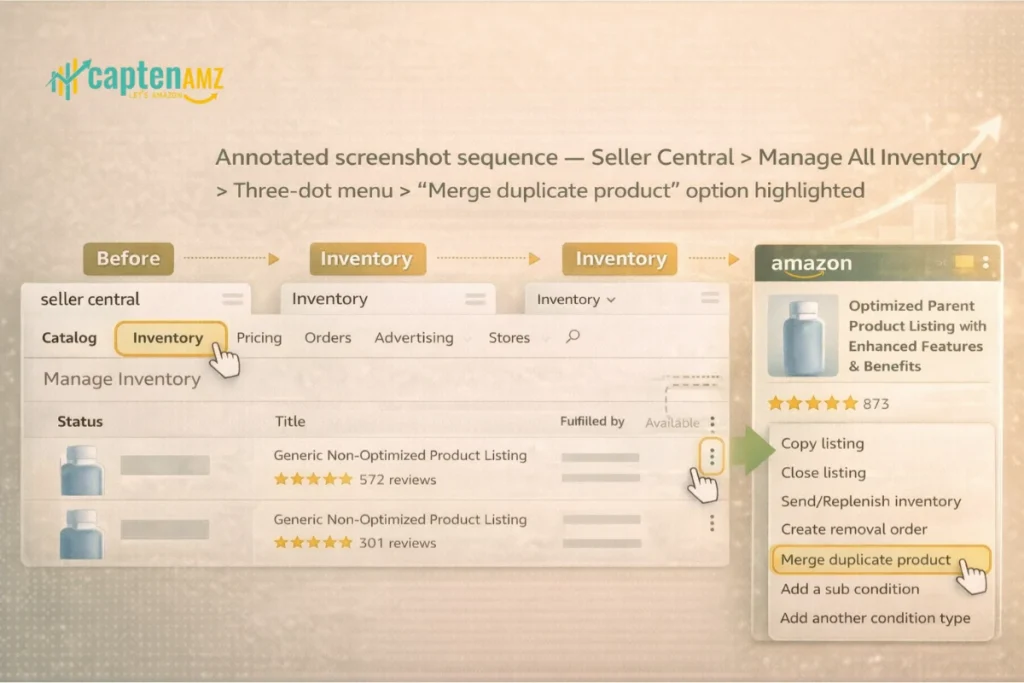
Here is the exact process for submitting a duplicate ASIN merge request through Amazon Seller Central:
Step 1: Log in to Seller Central
Go to sellercentral.amazon.com and log in with the account that owns the listings. If you are Brand Registry enrolled, you must be logged in as the rights owner.
Step 2: Navigate to Manage All Inventory
Go to Inventory → Manage All Inventory. Use the search or filter function to locate the source ASIN — the duplicate you want to retire.
Step 3: Select “Merge Duplicate Product”
Click the three-dot menu (⋮) next to the source ASIN. Select “Merge duplicate product” from the dropdown. This option may also be accessible via the Help menu under “Merge Duplicate or Split Product Pages.”
Step 4: Enter the Target ASIN
Enter the ASIN you want to keep (the target/surviving listing). Double-check this ASIN is correct before submitting — entering the wrong ASIN can result in merging the wrong listings.
Step 5: Provide a Reason and Supporting Documentation
Write a clear, concise explanation of why the merge is necessary. State that both listings represent the exact same product, include the product title, brand, UPC codes, and attach any manufacturer documentation or images confirming product identity. The clearer your case, the faster the approval.
Step 6: Submit and Monitor
Submit your request. Amazon typically responds within 24 to 72 hours. If approved, the duplicate ASIN will be deactivated and all contributions — reviews, sales history, inventory — will consolidate under the target ASIN. Note that review consolidation can take up to 72 hours after approval.
Step 7: Verify and Validate
After the merge completes, verify the following:
- The merged ASIN now redirects to the target listing
- Reviews from both listings appear on the primary product page
- Title, bullet points, images, and A+ content are intact
- FBA inventory has been remapped correctly (check within 24 hours)
- Active PPC campaigns are updated to the surviving ASIN
If anything appears incorrect after the merge, open a new case with Amazon Seller Support specifically labeled as “Post-Merge Listing Correction.” CaptenAMZ’s Amazon Listing Optimization team handles exactly these post-merge audits to ensure nothing was lost or corrupted during the consolidation.
6. How to Merge Amazon Listings with Different UPCs
One of the most common barriers sellers in the USA, UK, and European markets face is attempting to merge ASINs that have different UPC or GTIN codes. Amazon’s default system will reject the merge because the product identifiers do not match. Here is how experienced catalog managers solve this:
- Create a New ASIN: Using a valid GS1 UPC that matches your product, create a brand-new ASIN with product details — title, bullets, images, description — that are exactly identical to the old ASIN.
- Submit the Merge Request: List the new ASIN (with the GS1 UPC) as the target and the old ASIN (with the incorrect UPC) as the source. This gives Amazon a clean, valid identifier to approve.
- Monitor the Transfer: Once approved, confirm all reviews and sales history migrate correctly to the new ASIN.
| This process requires precision and knowledge of Amazon’s catalog system. Errors at any step can result in both ASINs becoming invalid. CaptenAMZ’s flat file specialists and catalog team execute this exact workflow for brands across New York, Texas, California, the UK, and EU markets regularly. |
7. Common Mistakes That Get Merge Requests Rejected
Amazon rejects a significant portion of merge requests — often due to avoidable errors. Here are the most frequent reasons for rejection, based on real seller cases:
| Rejection Reason | How to Avoid It |
| Products are not identical | Confirm matching brand, specs, size, color, material, and packaging before submitting |
| Mismatched UPCs/GTINs | Use the GS1 UPC workaround method described in Section 6 |
| Not the rights owner (Brand Registry) | Ensure the merge request comes from the rights owner account |
| Vague explanation submitted | Write a detailed, specific case explaining exactly why the merge is required |
| Amazon Retail contributing to one listing | Escalate to Catalog Support team to contact Amazon Retail directly |
| Merging non-identical variations | Only merge products that are genuinely the same item — never add unrelated products |
| Internal system rejection | Request the Catalog team contact an internal Amazon team to override the system block |
| CaptenAMZ Note If your merge request is rejected, do not simply resubmit the same request. Revise your documentation, add additional proof of product identity, and submit a clearer case. Repeated rejections with the same information will not produce different results. Our catalog team has successfully escalated and resolved dozens of initially rejected merge cases for sellers across the US and UK markets. |
8. Post-Merge Actions: Protect Your Ranking & PPC Campaigns
A successful merge is only half the job. What you do in the 48–72 hours after the merge determines whether you protect or lose the momentum you have built. Here is your post-merge action plan:
Audit Your Listing Immediately
Verify all listing content on the target ASIN — title, bullet points, product description, images, A+ content, and backend keywords. Merges can sometimes overwrite content from the stronger listing with content from the weaker one. If this happens, update immediately via Seller Central or use a flat file upload.
Rebuild or Redirect PPC Campaigns
Any Sponsored Product or Sponsored Brand campaigns tied to the source ASIN must be updated. Do not simply pause the old campaign — rebuild it on the surviving ASIN to preserve your ad history and keyword targeting structure. CaptenAMZ’s Amazon PPC management team specializes in this type of post-merge campaign reconstruction.
Learn more about our Amazon PPC Management Agency services for brands ready to dominate with clean, well-structured campaigns.
Monitor Search Ranking for 7–14 Days
Track your organic keyword rankings daily for one to two weeks after the merge. A successful merge should consolidate and improve rankings. A drop in ranking may indicate a content issue on the merged listing or an indexing delay — both of which are fixable if caught early.
Verify FBA Inventory
If you use Fulfilled by Amazon, check that all inventory from the source ASIN was remapped to the target ASIN within 24 hours. If inventory still shows under the old ASIN after 24 hours, contact the FBA team directly and request a manual inventory remap.
Run a Full Listing Optimization Pass
Post-merge is the perfect opportunity to optimize your surviving listing for maximum performance. Update your title with high-volume keywords, refresh bullet points, enhance A+ content, and ensure all backend search terms are populated.
CaptenAMZ Amazon Listing Optimization service covers every element of this post-merge optimization pass — from keyword research to A+ content enhancement for sellers across USA, UK, and European Amazon marketplaces.
9. When to Hire an Expert Amazon Catalog Management Agency
Not every merge is straightforward. Some catalog situations require expert intervention and attempting a complex merge without experience can cost you months of ranking progress. Consider hiring a specialist when:
- You have more than 3 duplicate ASINs that need to be consolidated
- Your merge requests have been rejected more than once
- You are dealing with Amazon Retail contributions on one of the ASINs
- Your listings involve different UPC/GTIN codes that need a workaround
- You have significant PPC campaigns tied to the source ASIN that need careful migration
- You are scaling into new markets — UK, Germany, France, or other EU marketplaces and need clean catalog structures from the start
- Your catalog has grown rapidly without a clear variation structure and now shows dozens of fragmented listings
CaptenAMZ is an Amazon catalog management and PPC agency that has resolved hundreds of complex catalog cases for brands across New Jersey, New York City, Texas, California, and international markets including the UK and Europe. Our team handles ASIN merges, variation rebuilds, flat file uploads, and complete catalog restructuring — so your listings are clean, compliant, and conversion-optimized.
🚀 Book a Free Discovery Call with CaptenAMZ →
| 🚀 Get Your FREE Catalog Audit — Worth $100 Book a 1-on-1 discovery call with CaptenAMZ catalog experts |
10. Frequently Asked Questions (FAQ)
Q: Can I merge Amazon listings without losing reviews?
Yes — when done correctly, a merge consolidates all reviews from both ASINs onto the surviving target listing. Review consolidation typically takes up to 72 hours after the merge is approved. If reviews do not appear after 72 hours, open a case with Amazon Seller Support.
Q: Will merging Amazon listings affect my sales history?
The surviving (target) ASIN retains its sales history. The source ASIN’s sales history may also transfer, depending on how Amazon processes the request. Always choose the ASIN with stronger historical performance as your target to minimize risk.
Q: How long does Amazon take to process a merge request?
Amazon Seller Support typically responds within 24 to 72 hours. However, complex cases involving Amazon Retail or Brand Registry issues can take longer. Follow up on the same case rather than opening a new one to maintain continuity.
Q: Can I merge listings across different Amazon marketplaces (US, UK, EU)?
No — ASIN merges are marketplace-specific. A US ASIN merge request does not affect the same product’s listing on Amazon UK, DE, or FR. Sellers operating across multiple markets need to manage merges separately for each marketplace, which is something CaptenAMZ handles across US, UK, and European regions.
Q: What happens to my FBA inventory after a merge?
Amazon’s system should automatically remap FBA inventory from the source ASIN to the target ASIN. If the inventory is still showing under the incorrect ASIN after 24 hours, contact the FBA team directly to request a manual remap.
Q: Is merging Amazon listings against Amazon’s policies?
No — Amazon actively encourages sellers to merge duplicate product pages. In fact, creating a new detail page for a product that already exists in the catalog is a policy violation. Merging is not only allowed but recommended as part of maintaining a clean, compliant Amazon catalog.
Conclusion: A Clean Catalog Is Your Competitive Advantage
Knowing how to merge Amazon listings the right way is one of the highest-leverage skills an Amazon seller can develop in 2025. A single, well-merged listing outperforms a fragmented catalog in every metric that matters: organic ranking, review credibility, Buy Box performance, PPC efficiency, and overall conversion rate.
The stakes are real. Brands across the USA from New Jersey boutique sellers to California enterprise brands and across European markets from the UK to Germany, are leaving significant revenue on the table every day their catalogs remain fragmented and unoptimized.
The process requires precision: identifying the right ASINs, choosing the correct merge type, preparing documentation, submitting a compelling Seller Support case, and executing a thorough post-merge audit. Done right, a merge can unlock ranking recovery, review consolidation, and PPC efficiency gains within days. Done wrong, it can cost you months of growth.
At CaptenAMZ, we have turned catalog chaos into competitive advantage for brands across the USA, UK, NJ, NYC, TX, California, and multiple European Amazon marketplaces. From ASIN merges and variation rebuilds to A+ content, listing optimization, and PPC management — we are the partner brands trust when the stakes are high and the catalog is complex.
| Ready to Merge, Optimize & Dominate Your Amazon Niche? Get your FREE Amazon Catalog Audit (Worth $100) and discover exactly how a clean, merged, and optimized catalog can add thousands to your monthly revenue. ✅ Explore Amazon Catalog Management → ✅ See Amazon Listing Optimization Services → 🚀 Book Your Free Discovery Call Now → |

Maria R. Donis is an Amazon eCommerce content specialist and digital marketing writer with hands-on experience creating data-driven, SEO-optimized content for Amazon-focused brands. She specializes in producing authoritative content around Amazon PPC management, catalog optimization, listing SEO, and marketplace growth strategies.
Maria collaborates closely with Amazon growth agencies like CaptenAMZ, ensuring that every piece of content reflects real Seller Central experience, platform-specific expertise, and up-to-date Amazon best practices. Her writing is guided by practical insights into how Amazon ads, search algorithms, and buyer behavior work in real-world scenarios.