You checked your Seller Central dashboard. Status says Active. Yet when you search for your product on Amazon, it is simply not there. No impressions. No traffic. No sales. If your Amazon Listing Not Showing in Search Results, you are not imagining things, and you are far from alone.
Every week, thousands of sellers across the United States, United Kingdom, and European marketplaces lose revenue to this exact problem, often without ever realizing what triggered it. Sellers in high-competition markets like New Jersey, New York City, Texas, and California face an especially brutal reality: a single day of zero search visibility can cost hundreds, sometimes thousands of dollars in missed sales.
This guide breaks down every major reason why your Amazon listing is not appearing in search, gives you a step-by-step diagnostic framework, and provides proven fixes backed by real Seller Central experience. Whether you are managing a single ASIN or a multi-thousand SKU catalog, the answers are here.
CaptenAMZ Quick Answer: An Amazon listing that is Active but invisible in search results is almost always caused by one of four root issues: search suppression, indexing failure, category/browse node mismatch, or a backend attribute error. The fix always starts with diagnosis, not guessing.
What Does “Amazon Listing Not Showing in Search” Actually Mean?
Before jumping into fixes, it is critical to understand what is actually happening when your Amazon product listing vanishes from search results. There are two distinctly different situations, and confusing them leads sellers down the wrong troubleshooting path.
A suppressed listing is technically live in your inventory, but Amazon has hidden it from all organic search results and browse pages. Customers cannot find it by searching relevant keywords. Your ads may still run, or may deliver almost no impressions. The listing page is still accessible via direct URL, but no shopper will stumble across it organically.
A deindexed or non-indexed listing is one that Amazon has never properly added to its search index for specific keywords, or has removed from the index after a content or compliance event. You may have zero impressions even with an active PPC campaign, because Amazon does not recognize your product as relevant to any search term.
Both situations require immediate attention. Every day your listing is invisible in search, you are losing organic rank history, review velocity, and compounding sales momentum that is genuinely hard to recover. Our Amazon catalog management service resolves both types of visibility loss systematically.

How to Instantly Check If Your Amazon Listing Is Suppressed or Deindexed
Run this diagnostic before doing anything else. Guessing causes more damage than the original problem.
Step 1: Check Suppression Status in Seller Central
Go to Seller Central → Inventory → Manage All Inventory. In the filter bar at the top, select Search Suppressed. If your ASIN appears here, Amazon has explicitly hidden it and will tell you the primary reason, whether it is a missing image, title violation, or attribute gap.
Step 2: Run the ASIN + Keyword Indexing Test
Go to Amazon’s search bar and type: [your ASIN] [your primary keyword] — for example, B09XK7VL2R stainless steel mixing bowl. If your product does not appear in the results, you are not indexed for that keyword. This is the fastest manual way to identify an indexing failure, and it costs nothing.
Step 3: Check Business Reports for Sessions
In Seller Central, go to Reports → Business Reports → Detail Page Sales and Traffic. If your sessions are zero or single digits over a 14-day window, your listing has lost search visibility, even if it looks Active on the surface. This is the hidden cost that kills seller accounts slowly.
Pro Tip from CaptenAMZ: Check your Listing Enhancements tab regularly. Amazon surfaces suppression reasons here before they cost you significant traffic. This is part of our standard weekly catalog health review for every client, from single-product sellers in New Jersey to multi-brand operators across the UK and Germany.
11 Reasons Your Amazon Listing Is Not Showing in Search Results (And How to Fix Each One)
1Non-Compliant Main Image
This is the single most common cause of listing suppression in 2026. Amazon’s algorithm enforces strict image standards, and a single violation on your primary image is enough to remove your product from all organic and paid search results. Your main image must have a pure white background (RGB 255, 255, 255), the product must fill at least 85 percent of the frame, and absolutely no promotional text, watermarks, logos, or accessories can appear.
Fix: Replace your main image with a compliant version. Upload via Manage All Inventory → Edit Listing → Images. Amazon typically re-indexes within 24 to 72 hours of a compliant image going live. Our Amazon A+ Content and Brand Store service includes full image compliance review across your catalog.
2Title Violation or Character Limit Breach
Amazon enforces title compliance aggressively in 2026. Titles exceeding the character limit for your category, containing promotional phrases like “Best Seller,” “Top Rated,” or “Sale,” using excessive capitalization, or including special symbols will trigger suppression or auto-correction, where Amazon rewrites your title and strips your target keywords in the process.
Fix: Review our Amazon product title formula guide and rewrite your title to the correct length and structure for your category. For most categories, the safe limit is 150 to 200 characters, but mobile truncation happens after 80 characters, so front-load your most important keyword.
3Missing Required Product Attributes
Amazon requires specific attributes for every product type, and these requirements vary by category. A listing that is missing mandatory fields such as brand name, GTIN or UPC, item dimensions, weight, or category-specific attributes like material, flavor, or size will either be prevented from going live or will become suppressed after Amazon’s quality crawlers flag it. Error Code 8560 (Missing required attribute) is one of the most common suppression triggers in the platform.
Fix: Download the current category-specific flat file template from Seller Central → Inventory → Add Products via Upload and cross-reference your listing data against the required fields column. This is precisely the kind of issue our Amazon flat file listing service resolves daily for brands across the USA and UK.
4Flat File Upload Error or Corrupt Template
When sellers use outdated flat file templates or submit files with formatting conflicts, attribute mismatches, or incorrect variation themes, Amazon either rejects the upload entirely or creates corrupted listing data that silently removes the ASIN from search. Error Code 8541 (Attribute Mismatch) and Error Code 1876 (Variation Theme Mismatch) are frequent offenders.
Fix: Always download the freshest template directly from Seller Central. After every upload, download and review the Feed Processing Summary Report, which maps every error code to the specific ASIN and field causing the issue. Our Amazon catalog error fix guide covers the full resolution framework we use at CaptenAMZ. For large catalogs, our catalog management team handles bulk flat file corrections without disrupting live listings.
5Wrong Category or Incorrect Browse Node
Placing your product in the wrong category is one of the most overlooked causes of invisible listings. Amazon uses browse nodes to organize products and to determine which search queries your listing should appear in. If your product is categorized incorrectly, even your most precisely targeted keywords will fail to generate impressions because the algorithm cannot contextualize your product’s relevance.
Fix: Search your primary keyword on Amazon. Identify the category that appears in the top 5 organic results. If your product is filed under a different node, submit a browse node correction via flat file upload or directly through Seller Support. Our Amazon listing optimization service includes full browse node and category alignment as a standard step.
6Broken or Missing Keywords in Backend Search Terms
Backend search terms are hidden keyword fields in Seller Central that tell Amazon what searches your product should appear in. In 2026, the limit remains 249 bytes per ASIN. Exceeding this byte limit by even a single byte causes Amazon to ignore the entire backend field, completely eliminating the additional indexing that field provides. Including competitor brand names, ASINs, or prohibited terms can also trigger a policy flag that suppresses your listing entirely.
Fix: Audit your backend search terms. Remove all repeated words (Amazon already indexes them from your title and bullets), commas, and prohibited terms. Use the remaining byte space for unique, relevant long-tail phrases that are not in your frontend listing content. This is one of the optimizations we apply during our Amazon listing optimization process for every account we manage.
7Pricing Error or High-Price Alert Flag
Amazon actively monitors pricing for what it calls “potentially high pricing errors,” which occur when a product is priced significantly above or below similar products on the platform, or when a price change creates a discrepancy between the list price and the sale price. A flagged pricing error can make your listing status change to Inactive, effectively removing it from search without any visible suppression message in your Listing Enhancements tab.
Fix: Go to Manage All Inventory and filter for Inactive listings. If a high-price alert is the cause, Amazon will show it. Correct the price and the listing should reactivate. For competitive pricing intelligence across categories, our Amazon PPC audit service includes pricing competitiveness analysis.
8Variation Structure Breakdown (Parent-Child Errors)
Variation errors are among the most complex suppression causes. When a parent-child structure breaks, whether from a flat file error, a wrong variation theme, or a conflicting attribute update, child ASINs can lose their search visibility even while appearing Active in Seller Central. If your listing has multiple sizes, colors, or styles, a single broken child ASIN can pull impressions from the entire variation family.
Fix: Download your Category Listings Report and audit the variation theme and parent-child relationships for each ASIN. Our Amazon variation listing service guide covers the complete framework for building and repairing parent-child structures correctly. For active suppression cases involving variation breakdowns, our catalog management team resolves these without deleting and relisting where possible, protecting your existing review history and ranking signals.
9Adult Content or Restricted Keyword Flag
Amazon’s content filters are aggressive. If a word in your backend search terms, product description, or bullets triggers an adult content or restricted keyword flag, your listing is removed from default search results without a suppression notice appearing in Listing Enhancements. Many sellers discover this problem only after weeks of zero organic traffic, having assumed the issue was a ranking or PPC problem.
Fix: Audit every text field in your listing for restricted terms, including medical claims, pesticide-related language, or inadvertently flagged words. Remove any flagged content and submit the listing for review. Our suppressed listing fix guide details the exact appeal process and Seller Support case structure that produces the highest reinstatement success rate.
10Out of Stock or FBA Inventory Failure
This is straightforward but chronically overlooked: out-of-stock listings disappear from organic search results. If you sell via FBA and your inventory at Amazon’s fulfillment centers hits zero, your listing goes inactive for organic search. The deeper issue is that the organic ranking you built takes weeks to rebuild after restocking, because Amazon’s algorithm penalizes extended stockouts.
Fix: Set replenishment alerts in Seller Central and monitor your FBA storage levels weekly. For sellers managing large catalogs across multiple US fulfillment centers and UK or EU warehouses, maintaining a buffer inventory plan is essential. Our Amazon account management consultation includes inventory health review as part of our onboarding process.
11New Listing Indexing Delay or Account Review Hold
For brand-new listings, Amazon requires 24 to 72 hours to fully index a new ASIN across all keywords. For sellers who are new to Amazon, especially in the USA and UK markets, Amazon may also place a 1 to 3 business day account review hold on all new listings. During this period, your product will not appear in any search results, and Seller Support may incorrectly tell you everything is working normally.
Fix: Wait the full 72 hours. If the listing still does not appear after that window, run the ASIN + keyword indexing test described in Section 2, then check Listing Quality under Fix Your Products in Seller Central. To accelerate indexing on a new listing, consider running a small Sponsored Products campaign on your primary keyword, since PPC activity forces faster algorithmic attention.
Quick Reference: Amazon Listing Visibility Problems and Solutions
| Problem | Where to Check in Seller Central | Fix Timeline |
|---|---|---|
| Non-compliant main image | Inventory → Listing Enhancements | 24 to 72 hours after fix |
| Title violation | Manage All Inventory → Edit Listing | 24 to 48 hours |
| Missing required attributes | Fix Your Products / Listing Enhancements | 4 to 24 hours |
| Flat file error | Inventory → Monitor Upload Status | 1 to 6 hours after re-upload |
| Wrong browse node / category | Edit Listing → More Details → Category | 24 to 72 hours |
| Backend keyword byte overflow | Edit Listing → Keywords tab | 24 to 48 hours |
| High-price alert | Manage Inventory → Inactive filter | Immediate to 4 hours |
| Variation/parent-child error | Category Listings Report | 24 to 96 hours |
| Adult/restricted flag | Contact Seller Support for case | 3 to 14 business days |
| Out of stock | FBA Inventory Dashboard | Immediate upon restock |
| New listing indexing delay | Wait 72 hours, run ASIN+keyword test | 24 to 72 hours |
How Amazon Listing Visibility Affects Your PPC Performance

Many sellers try to solve a listing visibility problem by increasing their PPC budget. This is exactly backwards, and it is one of the most expensive mistakes you can make on Amazon. When your listing is suppressed or deindexed, your Amazon PPC campaigns will either deliver zero impressions, or they will consume budget while converting almost no clicks into sales, because the underlying listing quality signal is broken.
Amazon’s A10 algorithm uses your listing’s health as a relevancy signal when determining ad placement priority. Suppressed listings, incomplete attribute data, and broken variation structures directly reduce your ad eligibility and Quality Score equivalent. This means your cost-per-click rises while your impression share falls, a double hit that can make an otherwise well-structured campaign look like a complete failure.
The correct sequence is always to fix your listing visibility first, then optimize your Amazon PPC optimization on top of a clean, healthy listing foundation. Our teams always run a full listing audit before touching campaign structure. If you want to understand how your listing quality is costing you in PPC specifically, our Amazon PPC audit surfaces exactly these connection points.
Prevention: How to Stop Your Amazon Listing From Disappearing Again
Fixing the immediate problem is only half the job. Sellers who come back with the same suppression issue three months later almost always skipped the prevention layer. Here is the catalog hygiene routine that CaptenAMZ applies for every account we manage, from single-product brands in New Jersey to enterprise sellers managing thousands of ASINs across the USA, UK, and European marketplaces.
- Run weekly Listing Quality Dashboard checks: Inventory → Listing Quality and Suppressed Listing Report
- Download a fresh category flat file template every 90 days. Amazon updates templates without announcing it, especially after major policy cycles
- Validate all flat files in a staging sheet before uploading to live listings
- Maintain a Master Flat File library with working variation templates per product type
- Monitor backend search term byte counts using a free byte-counter tool before every update
- Check image compliance after every image update using the Seller Central image preview tool
- Set FBA restock alerts at a minimum 30-day cover point, adjusted for your sales velocity
- Review all Seller Central performance notifications weekly, including Policy Compliance alerts
- Audit title and bullet point compliance every 60 days against Amazon’s current category style guides
For brands that cannot run this routine internally, our ongoing catalog management service handles the entire prevention workflow proactively. Our clients in New York City, Texas, California, and across the UK have seen a dramatic reduction in suppression events after implementing this routine, because the system catches issues before Amazon’s crawlers do.
Listing Visibility and Amazon SEO: The Connection Most Sellers Miss
Fixing a suppressed or deindexed listing is not just about restoring traffic in the short term. It is about protecting your long-term Amazon SEO position. Amazon’s ranking algorithm rewards consistent sales velocity, click-through history, and conversion rate. Every day your listing is invisible in search, your organic rank history is eroding while your competitors gain the exact positions you should be occupying.
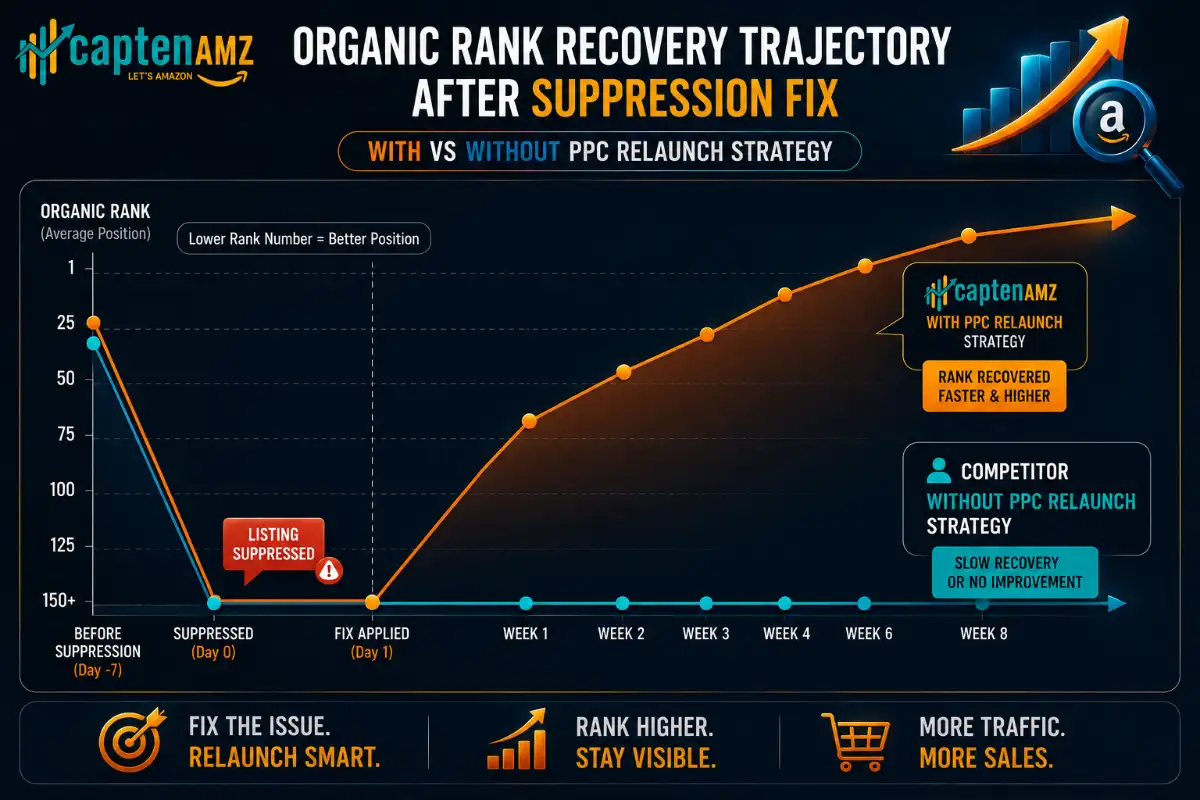
When your listing returns to search after a suppression fix, it often returns at a lower rank than before the suppression event. This means you typically need a deliberate relaunch strategy: targeted Amazon PPC campaigns, potentially a temporary bid increase on your primary keywords, and a focus on driving early conversion velocity to signal relevance to the algorithm.
The sellers who recover fastest from listing visibility events are those who have optimized A+ Content supporting higher conversion rates and who pair their relaunches with well-structured Amazon A+ Content and Brand Store presence. Higher conversion rate means that even at lower initial organic rank, the algorithm reweights your product upward faster.
Case Study Snapshot: CaptenAMZ Resolves Visibility Loss for USA Lighting Brand
A lighting brand operating across New Jersey and California came to CaptenAMZ after a major flat file upload corrupted their parent-child variation structure across 47 ASINs. Within 72 hours of the upload, all child variation listings had dropped out of search. The brand was losing approximately $38,000 per day in sales across their catalog. Their in-house team had attempted two flat file re-uploads without success, each compounding the original attribute mismatch errors.
CaptenAMZ’s catalog team diagnosed the root cause as a variation theme mismatch combined with an outdated flat file template that used deprecated column headers. We rebuilt the entire parent-child structure using the current template, resolved 4 separate error codes in the Feed Processing Summary Report, and restored all 47 ASINs to full search visibility within 96 hours. Within two weeks, the brand had recovered organic rank positions within 12 percent of pre-suppression levels. Read the full lighting brand case study to see the full numbers behind this recovery.
CaptenAMZ is the Amazon catalog and PPC agency trusted by brands across the USA, UK, and Europe to fix listing visibility problems fast and prevent them from recurring. Based in Trenton, New Jersey, we serve sellers in NJ, New York City, Texas, California, and across the UK and EU marketplaces.
Amazon Listing Not Showing in Search: Warnings and Common Mistakes
- Do not delete and relist as your first fix. Deleting a suppressed ASIN erases your review history, rating, and any organic rank history. Always attempt an attribute fix or flat file correction first
- Do not reuse old flat file templates. Amazon updates category templates without announcement, especially after Q4 and major policy review cycles. Old column headers cause immediate upload rejection
- Do not increase PPC spend to diagnose a visibility problem. Ads cannot fix a structural listing issue. Spending more on campaigns against a suppressed listing is pure waste
- Do not add competitor brand names to backend search terms. This is a fast path to an adult content or policy violation flag that can suppress your listing for weeks
- Do not make multiple simultaneous changes to a suppressed listing. Change one element at a time and allow 24 to 48 hours between edits. Stacking changes makes it impossible to identify which fix resolved the issue
- Do not ignore the Feed Processing Summary Report. This report is your primary diagnostic tool after every flat file upload. Not downloading and reading it is the number one reason flat file fixes fail on the first attempt
When to Call in Amazon Catalog Professionals
Most of the fixes described in this guide are manageable for experienced sellers who have time and Seller Central familiarity. But there are specific situations where attempting a DIY fix will cause more damage than the original problem, and where professional intervention is the right call.
You should contact a professional Amazon catalog management agency when any of the following are true: your suppression affects more than 10 ASINs simultaneously; your flat file re-upload attempts have failed twice or more; your variation structure has broken parent-child relationships across a large family; your listing has been flagged for a policy or compliance violation requiring a formal Seller Support appeal; or your listing was previously ranked in the top 10 results and a suppression event has dropped it out entirely, requiring a structured relaunch strategy.
For sellers in competitive categories across New York, Texas, California, and the UK, the cost of even three to five days of incorrect troubleshooting often exceeds the cost of professional intervention several times over. Our Amazon consulting service provides rapid triage and a clear action plan, usually within 24 hours of engagement.
If you are also running PPC alongside a suppression issue, our specialists integrate both the catalog fix and the PPC campaign recovery into a single coordinated plan, ensuring that the moment your listing returns to search, your ad campaigns are fully optimized to recapture rank as fast as possible.
Frequently Asked Questions: Amazon Listing Not Showing in Search Results
Why is my Amazon listing Active but not showing in search results?
An Active status in Seller Central confirms your listing exists in Amazon’s catalog, but it does not guarantee search visibility. Your listing can be Active and simultaneously search-suppressed due to a missing image, title violation, incomplete attributes, or a policy flag. It can also be Active but deindexed for specific keywords, meaning Amazon does not consider it relevant to those search terms. Run the ASIN plus keyword test in Amazon’s search bar to confirm indexation status for each of your target keywords.
How long does it take for an Amazon listing to appear in search results after a fix?
After resolving a suppression issue, Amazon typically re-indexes your listing within 24 to 72 hours. Image fixes tend to resolve fastest, often within 24 hours. Attribute and flat file corrections may take 48 to 72 hours. Policy-related suppression cases that require a formal Seller Support appeal can take 3 to 14 business days, depending on the category and the nature of the violation.
Can running Amazon PPC ads fix a listing that is not showing in search organically?
Sponsored Products campaigns can force indexation for specific keywords in some cases, which is why small targeted PPC campaigns are sometimes used as part of a listing relaunch strategy. However, PPC cannot fix structural suppression caused by image violations, missing attributes, or compliance flags. You must resolve the root cause first, then use PPC to accelerate rank recovery. Running ads against a suppressed listing before fixing the underlying issue wastes budget.
Will I lose my reviews if I delete and relist a suppressed Amazon listing?
Yes. Deleting a listing and creating a new ASIN removes your review history, star rating, and organic rank data. This is almost always the wrong approach for suppression. In the vast majority of suppression cases, the correct path is to fix the attribute, image, or compliance issue via Seller Central or flat file, without deleting the ASIN. Only delete and relist if Amazon has permanently removed the ASIN from its catalog, which is a separate situation.
How do I check if my Amazon listing is indexed for my target keywords?
Go to Amazon’s search bar and type your ASIN followed by a space and the keyword you want to check. For example: B09XK7VL2R silicone baking mat. If your product appears in the results, you are indexed for that term. If it does not appear, you are not indexed. Run this test for each of your top 5 to 10 primary keywords to build a complete picture of your indexation health before deciding on a fix strategy.
Can a flat file upload cause my Amazon listing to disappear from search?
Yes, and this is one of the most common causes of sudden, large-scale listing visibility loss. A flat file with outdated column headers, attribute mismatches, incorrect variation themes, or formatting errors can corrupt listing data across hundreds of ASINs in a single upload. Always download the Feed Processing Summary Report after every upload, and never use a flat file template that is more than 90 days old. If a bulk upload has already caused suppression across multiple listings, professional catalog intervention is the fastest path to recovery.
Does CaptenAMZ help fix suppressed Amazon listings for sellers in the UK and Europe?
Yes. CaptenAMZ provides Amazon catalog management and listing visibility recovery services across all major marketplaces, including the USA (with active clients in New Jersey, New York, Texas, and California), United Kingdom, Germany, France, and other EU markets. Our catalog team handles suppression resolution, flat file corrections, variation structure rebuilds, and compliance appeals across all supported Amazon marketplaces. Contact us for a free catalog audit.
Your Amazon Listing Needs to Be Found to Make Sales: Take Action Today
An invisible Amazon listing is not just a technical problem. It is a revenue leak that compounds every single day it goes unfixed. The organic rank you are not building today will take weeks to rebuild later. The sales you are losing to competitors right now are customers who found what they needed and converted, and who may never search again.
The good news is that every cause of Amazon listing invisibility in this guide is fixable. Most can be resolved within 24 to 72 hours when you know exactly what to look for and how to address it correctly. The sellers who win on Amazon in 2026 are not necessarily those with the best products. They are the ones who maintain clean, compliant, fully indexed catalogs that the algorithm consistently rewards with search visibility.
If your listing is invisible right now and you need fast, expert intervention, CaptenAMZ’s catalog team is available to assess your account and prioritize the fix. Whether you are dealing with a single suppressed ASIN or a platform-wide visibility crisis across hundreds of listings, our team has resolved cases exactly like yours across the USA, UK, and European Amazon marketplaces.
Start with our Amazon catalog management service overview to understand the full scope of what we do, or explore our Amazon listing optimization service to see how we rebuild listings from the ground up for maximum search visibility and conversion. You can also read our detailed suppressed listing resolution guide or our Amazon catalog error fix guide for deeper technical walkthroughs.
For sellers who also want to rebuild PPC performance alongside their listing recovery, our Amazon PPC management agency integrates campaign recovery with catalog repair in a single coordinated strategy. We also offer a standalone Amazon PPC audit to pinpoint exactly how your listing visibility issues have been affecting your advertising performance and what it will take to correct course. See us on LinkedIn & Instagram.
CaptenAMZ is based in Trenton, New Jersey, and serves Amazon sellers across the United States, including New York City, New Jersey, Texas, and California, as well as the United Kingdom and European markets. Book a free discovery call with our team and let us show you exactly why your listing is not showing and exactly how we fix it.
Stop losing revenue to suppression and indexing failures. Our catalog specialists diagnose and fix Amazon listing visibility issues across USA, UK, and European marketplaces — fast. Get a Free Catalog Audit
Book a Strategy Call
CaptenAMZ | Trenton, NJ | Serving USA, UK & European Amazon Sellers | info@captenamz.com

Maria R. Donis is an Amazon eCommerce content specialist and digital marketing writer with hands-on experience creating data-driven, SEO-optimized content for Amazon-focused brands. She specializes in producing authoritative content around Amazon PPC management, catalog optimization, listing SEO, and marketplace growth strategies.
Maria collaborates closely with Amazon growth agencies like CaptenAMZ, ensuring that every piece of content reflects real Seller Central experience, platform-specific expertise, and up-to-date Amazon best practices. Her writing is guided by practical insights into how Amazon ads, search algorithms, and buyer behavior work in real-world scenarios.