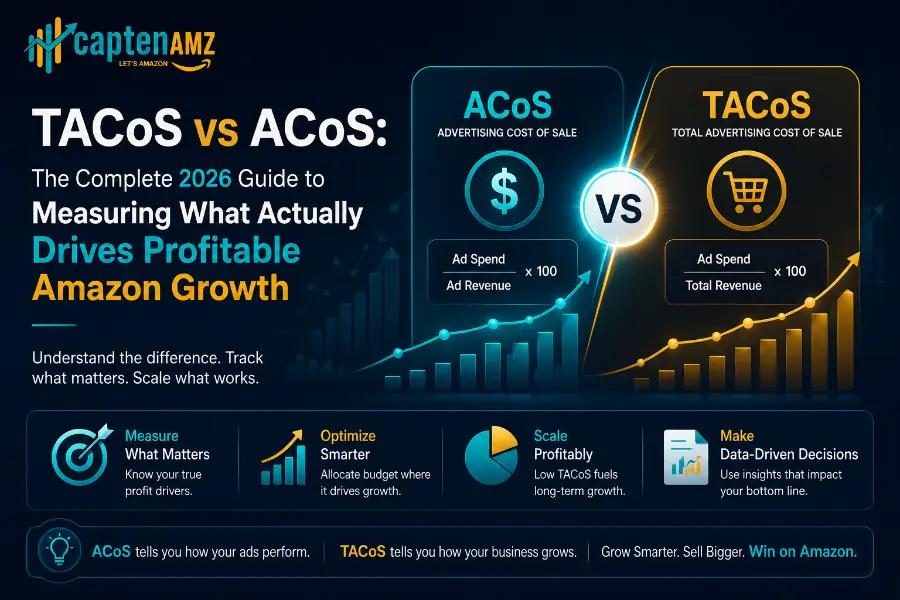
Most Amazon sellers know what ACoS is. They watch it daily, panic when it rises, and celebrate when it falls. Yet the same sellers are quietly losing money on decisions that look brilliant through the ACoS lens and catastrophic through the only metric that actually measures business health. That metric is TACoS — Total Advertising Cost of Sales — and in 2026 it has become the single most important number in Amazon PPC management.
The difference between Amazon TACoS vs ACoS is not just a formula variation. It is the difference between measuring whether your campaigns are efficient and measuring whether your business is actually growing. Sellers and agencies that confuse these two metrics make decisions that optimize the wrong thing. They cut spend that was building organic rank. They pause campaigns that were creating halo revenue. They celebrate a falling ACoS at the exact moment their TACoS reveals the business is stagnating.
This guide breaks down every dimension of the Amazon TACoS versus ACoS question: what each metric measures, how to calculate them, what benchmarks to target at every stage of your business, how to read the combinations that predict growth versus decline, and the exact framework the CaptenAMZ Amazon PPC management team uses to manage both metrics simultaneously for brands across the USA, UK, and European Amazon marketplaces.
CaptenAMZ Fast Answer: ACoS measures how efficiently your Amazon ad campaigns convert spend into ad-attributed revenue. TACoS measures how much of your total Amazon revenue — including organic sales your ads helped drive — your advertising is costing. ACoS is a campaign metric. TACoS is a business metric. You need both, but TACoS is the one that predicts profitable long-term growth.
What Is Amazon ACoS? Definition, Formula and What It Actually Tells You
ACoS stands for Advertising Cost of Sales. It is the native performance metric inside Amazon Seller Central’s Campaign Manager, and it answers one specific question: for every dollar of revenue directly attributed to a clicked ad, what percentage of that revenue did you spend on advertising to generate it?
ACoS Formula
ACoS (%) = (Total Ad Spend ÷ Total Ad-Attributed Revenue) × 100Example: You spend $500 on ads and generate $2,000 in ad-attributed revenue.
ACoS = ($500 ÷ $2,000) × 100 = 25%
Meaning: You spent $0.25 in ads for every $1.00 earned from those ads.
ACoS appears automatically in your Seller Central Campaign Manager dashboard. Lower ACoS generally signals more efficient campaigns — you are spending less advertising dollars to generate each dollar of ad-driven revenue. Higher ACoS signals the opposite: campaigns are working harder for each dollar they produce. The critical limitation of ACoS is what it does not see. ACoS only counts sales where a shopper clicked your ad and then bought your product within Amazon’s attribution window. It completely ignores all organic sales, including the organic sales that your advertising directly caused by lifting your keyword rankings, increasing your sales velocity, and building your brand’s search presence.
This is the gap that makes ACoS a dangerous sole decision-making metric. A brand that cuts all its ad spend today will immediately see ACoS improve to zero — and simultaneously watch total revenue collapse as the organic rankings those ads were maintaining begin to decay. Understanding your break-even ACoS target is essential before you can interpret whether a given ACoS number is healthy or damaging for your specific margin structure.
What Is Amazon TACoS? Definition, Formula and Why It Changes Everything
TACoS stands for Total Advertising Cost of Sales. Unlike ACoS, which divides your ad spend by only the revenue directly attributed to ads, TACoS divides your total ad spend by your total Amazon revenue — including every organic sale that happened during the same period, whether or not a shopper clicked an ad to generate it.
TACoS FormulaTACoS (%) = (Total Ad Spend ÷ Total Amazon Revenue) × 100Example: You spend $500 on ads. Total Amazon revenue (paid + organic) = $10,000.
TACoS = ($500 ÷ $10,000) × 100 = 5%
Meaning: Advertising costs you 5 cents for every dollar of total Amazon revenue.
Note: Your ACoS in this same scenario might show 25% (if ad-attributed sales = $2,000).
Same business. Same spend. Two completely different pictures of performance.
TACoS does not live inside Campaign Manager. You calculate it yourself by combining your total ad spend from Campaign Manager with your total business revenue from Seller Central → Reports → Business Reports → Summary. This is exactly why most sellers ignore it — it requires manual calculation or a third-party reporting tool. And it is also exactly why the sellers who do track it consistently outperform those who do not. The CaptenAMZ Amazon PPC audit service includes a full TACoS analysis as a core deliverable, because it is impossible to correctly diagnose account performance without it.
TACoS captures what ACoS cannot: the halo effects of advertising. Every Sponsored Products campaign that pushes a keyword to page one generates organic impressions and organic conversions that no ad click triggers. Every Sponsored Brands campaign that increases branded search volume generates direct search traffic that converts without a campaign touchpoint. Every sale driven by PPC increases your sales velocity, which improves your organic keyword ranking, which generates more organic sales — none of which ACoS measures. TACoS measures all of it.
Amazon TACoS vs ACoS: The 8 Key Differences Every Seller Must Understand
ACoS
Advertising Cost of Sales
- Measures campaign efficiency only
- Visible directly in Campaign Manager
- Counts ad-attributed revenue only
- Daily / weekly optimization metric
- Hides organic sales entirely
- Can look great while business shrinks
- Use for: bid decisions, keyword cuts
- Does not measure brand health
TACoS
Total Advertising Cost of Sales
- Measures total business health
- Requires manual calculation
- Counts all Amazon revenue (paid + organic)
- Monthly / quarterly strategic metric
- Captures organic revenue growth
- Cannot hide business-level problems
- Use for: scaling decisions, budget strategy
- Predicts long-term brand profitability

The most important conceptual shift is this: ACoS and TACoS are not competing metrics. They are complementary lenses on the same account. ACoS tells you which campaigns to optimize on a weekly basis. TACoS tells you whether your overall advertising strategy is building a compounding, self-sustaining business or an expensive traffic dependency. The Amazon PPC optimization strategies that deliver long-term profitability always target both metrics simultaneously — not one at the expense of the other.
Amazon TACoS Benchmarks 2026: What Numbers Should You Be Targeting?
There is no single correct TACoS target. Your ideal TACoS depends on your product lifecycle stage, your category competition level, your margin structure, and your current organic ranking position. What is healthy for a brand in launch phase will signal over-spending for a mature brand with established organic rankings.
| Business Stage | TACoS Target Range | ACoS Context | What It Signals |
|---|---|---|---|
| New product launch | 15% – 25% | Often 30%–60%+ | Expected. Ads are buying rank, not yet generating organic return |
| Growth phase (10–100 reviews) | 10% – 18% | 20%–35% | Organic sales starting to emerge. TACoS should be declining month-over-month |
| Established brand | 6% – 12% | 15%–25% | Organic sales driving majority of revenue. Ads maintaining and expanding rank |
| Mature / dominant brand | 3% – 8% | 10%–20% | High organic share. Ads primarily defensive and new-customer acquisition |
| Aggressive scaling phase | 12% – 22% | 25%–45% | Intentional TACoS increase to capture new keywords and markets. Acceptable if TACoS falls after 60–90 days of scaling investment |
CaptenAMZ Benchmark Rule: A healthy, scaling account shows a TACoS that trends downward over time as organic sales grow, while total revenue simultaneously increases. TACoS falling while revenue falls is not health — it is contraction. Always evaluate TACoS direction in the context of what total sales are doing at the same time. This is the single most important interpretation principle in our Amazon PPC management framework.
For competitive categories in the USA — particularly brands targeting buyers in New Jersey, New York City, Texas, and California — TACoS benchmarks run slightly higher than global averages because CPC rates in the US marketplace are among the highest on the platform. A supplement brand in California with a mature product might operate at 10 to 12 percent TACoS and consider that highly efficient, while the same number would indicate over-spending for a similar product in a less competitive European market. Our Amazon PPC consultation service sets market-specific TACoS targets for every account based on category CPC data and local margin structures.
The 4 TACoS vs ACoS Signal Combinations and What Each One Means
The real diagnostic power of tracking both metrics simultaneously comes when you read them together. There are four possible combinations of ACoS and TACoS movement, and each one tells a completely different story about what is happening in your account.
ACoS Stable / TACoS Falling
Signal: Organic growth compounding. Your ads are driving sales velocity that is building organic rank. Organic revenue is rising. This is exactly what you want. Do not cut ad spend — this machine is working. Scale carefully.
ACoS Rising / TACoS Falling
Signal: Strong organic flywheel. Campaigns may appear less efficient but organic sales are growing faster than ad spend rises. Your PPC investment is building organic dominance. This is a growth signal, not a warning. Many sellers incorrectly panic here and cut spend.
ACoS Falling / TACoS Rising
Signal: Organic sales declining. Campaigns look more efficient because you are paying for a smaller share of revenue — but total revenue is shifting toward paid dependency. Organic rank is eroding. Fix your listing and expand keyword targeting before this worsens.
ACoS Rising / TACoS Rising
Signal: Account under stress. Campaigns are becoming less efficient AND organic sales are not growing to compensate. This is the danger zone. Immediate audit required. Campaign structure, listing quality, and keyword targeting must all be reviewed before increasing any budget.
Reading these four signals accurately is the core of how the CaptenAMZ PPC team makes weekly and monthly strategy decisions across client accounts. Understanding which signal your account is currently in determines whether the right action is to scale spend, hold spend, restructure campaigns, or invest in listing optimization first. An Amazon PPC audit will tell you exactly which signal pattern your account is currently generating and what the correct response is.
How to Calculate TACoS for Your Amazon Account: Step-by-Step
TACoS is not a metric Amazon shows you natively. You build it from two reports that every seller already has access to, whether or not they are brand-registered. Here is exactly how to calculate it.
Get your total ad spend. Go to Seller Central → Advertising → Campaign Manager → Sponsored Products (or all campaign types). Set your date range (we recommend a full calendar month for the most meaningful TACoS calculation). Note your total spend across all active campaigns — Sponsored Products, Sponsored Brands, and Sponsored Display combined. This is your numerator.
Get your total Amazon revenue. Go to Seller Central → Reports → Business Reports → By ASIN → Detail Page Sales and Traffic by Parent Item. Set the same date range. Sum the “Ordered Product Sales” column across all ASINs. This figure includes both your ad-attributed sales and your organic sales. This is your denominator. Do not use your Campaign Manager revenue figure here — that only captures ad-attributed sales, which would produce ACoS, not TACoS.
Calculate and track over time. Divide your total ad spend (Step 1) by your total revenue (Step 2) and multiply by 100 to get your TACoS percentage. Record this figure in a simple tracking spreadsheet — month over month, not week over week. TACoS has natural weekly volatility due to day-of-week traffic patterns, promotional events, and campaign budget pacing. Monthly TACoS is the signal. Weekly TACoS is the noise.
CaptenAMZ Tracking Tip: Track TACoS monthly alongside total revenue, total ad spend, and organic sales percentage (organic sales ÷ total revenue). This four-metric dashboard gives you the complete picture of whether advertising is building compounding organic growth or sustaining an expensive paid-traffic dependency. Every client in our Amazon PPC management program receives this dashboard as part of their weekly reporting package.
How to Lower Amazon TACoS Without Cutting Your Ad Spend
This is the question every seller eventually asks, and most of them approach it completely wrong. The instinctive response to a high TACoS is to cut ad spend — reduce the numerator, lower the percentage, problem solved. This approach destroys organic rank, collapses sales velocity, and creates a vicious cycle where falling organic sales push the TACoS even higher over the following 60 to 90 days. The correct way to lower TACoS is to increase organic sales faster than ad spend grows, not to reduce the numerator.

Lever 1: Optimize Your Listing to Convert Better
The most direct path to a lower TACoS is a higher conversion rate. Every percentage point you gain in conversion rate means your existing paid traffic generates more revenue, which increases the denominator of your TACoS calculation while the numerator (ad spend) stays the same. A listing that converts at 15 percent versus 10 percent on the same ad spend produces a 33 percent lower TACoS, automatically. This is why Amazon listing optimization — title structure, bullet quality, images, and A+ Content — is always the first investment before aggressive PPC scaling. Our Amazon A+ Content optimization guide shows exactly how listing content upgrades translate into measurable TACoS reductions within 30 to 60 days of going live.
Lever 2: Build Organic Rank Through Strategic PPC Velocity
Every time your Sponsored Products campaigns drive a sale for a target keyword, Amazon’s algorithm registers a sales velocity signal for that keyword and adjusts your organic ranking upward. The cumulative effect of consistent PPC-driven sales velocity is organic rank improvement, which generates organic sales on top of paid sales. As organic sales grow, your total revenue denominator grows faster than your ad spend numerator, and TACoS falls. This is the PPC-to-organic flywheel, and building it intentionally is the primary goal of every Amazon PPC campaign strategy we design at CaptenAMZ. For a detailed look at how to drive keyword ranking through structured PPC campaigns, our Amazon keyword research for PPC guide covers the full framework.
Lever 3: Eliminate Wasted Spend Through Negative Keyword Architecture
Every irrelevant click your broad match or auto campaigns generate is money spent on traffic that will never convert. Non-converting spend increases the numerator of your TACoS without adding any revenue to the denominator. Aggressive negative keyword management — removing non-converting search terms weekly and blocking irrelevant match types at campaign setup — directly reduces wasted ad spend, which lowers TACoS without touching your bids on converting terms. A systematic negative keyword strategy can reduce wasted spend by 20 to 35 percent within the first 60 days. This is one of the first optimizations applied in every Amazon PPC optimization engagement at CaptenAMZ.
Lever 4: Improve Your Catalog Health and Listing Indexing
Listings that are suppressed, deindexed for key terms, or carrying broken variation structures cannot generate organic sales regardless of how well your PPC campaigns are running. A catalog health problem that prevents your ASINs from ranking organically for their target keywords means all your sales have to come through paid channels, artificially inflating TACoS. Our Amazon catalog management service resolves suppression, indexing failures, and flat file errors that are silently preventing organic sales from growing — often recovering 15 to 25 percent of lost organic revenue within 30 days of remediation. For sellers whose listings are not showing in search, our guide to fixing Amazon listing visibility covers every cause and solution.
Lever 5: Use Dayparting to Concentrate Spend on High-CVR Windows
Concentrating your ad spend during the hours and days when your specific buyer demographic has the highest purchase intent produces more conversions per dollar of ad spend, which increases the revenue your budget generates without increasing total spend. Higher revenue from the same spend lowers TACoS directly. For brands selling to USA buyers in New Jersey, New York, Texas, and California, peak conversion windows vary by product category and demographic profile. Our Amazon dayparting guide shows exactly how to implement bid scheduling rules that concentrate spend during peak conversion windows without losing coverage during discovery hours.
Not Sure Whether Your ACoS or TACoS Is Healthy?
CaptenAMZ audits both metrics across your full account in 48 hours — identifying every efficiency gap, organic sales shortfall, and wasted spend pattern. No obligation.Get a Free PPC Audit Book a Strategy Call
ACoS vs TACoS: Common Mistakes That Cost Amazon Sellers Thousands Every Month
- Cutting ad spend to lower TACoS. This is the single most common and most damaging mistake. Reducing spend lowers the numerator temporarily but simultaneously collapses the organic rank that spending was building, causing TACoS to spike even higher 60 to 90 days later when organic rankings decay
- Setting the same TACoS target regardless of product stage. A 10% TACoS expectation during a product launch phase will strangle the spend needed to build initial rank and velocity. A 25% TACoS on a mature, established product signals serious over-spending. TACoS targets must reflect the product lifecycle stage
- Tracking ACoS only and ignoring TACoS entirely. Sellers who only see ACoS make cuts that look disciplined but are actually destroying organic equity. The most reliable leading indicator that a seller is in this pattern is rising ACoS paired with declining total organic sales share — visible only if you are tracking both metrics
- Evaluating TACoS week-to-week instead of month-to-month. Weekly TACoS is noisy due to traffic patterns, day-of-week variation, and campaign pacing. Monthly TACoS is the signal. Sellers who optimize TACoS on a weekly horizon make reactive decisions based on statistical noise, not strategic trends
- Not connecting listing quality to TACoS performance. A high TACoS caused by poor conversion rate cannot be fixed by bid adjustments. If your listing does not convert paid traffic, reducing bids just reduces revenue. The fix is always the listing first, then the bid strategy. Our listing optimization service resolves the conversion side of TACoS problems that PPC management alone cannot address
- Applying US TACoS benchmarks to UK and EU marketplace campaigns. TACoS benchmarks vary by marketplace due to differences in CPC levels, organic competition intensity, and category maturity. UK brands and EU sellers need marketplace-specific TACoS targets, not a copy-paste of US standards. Our multi-marketplace PPC management service applies localized benchmarks for every market we manage
TACoS, ACoS and the Amazon Organic Flywheel: How the Metrics Connect to Long-Term Growth
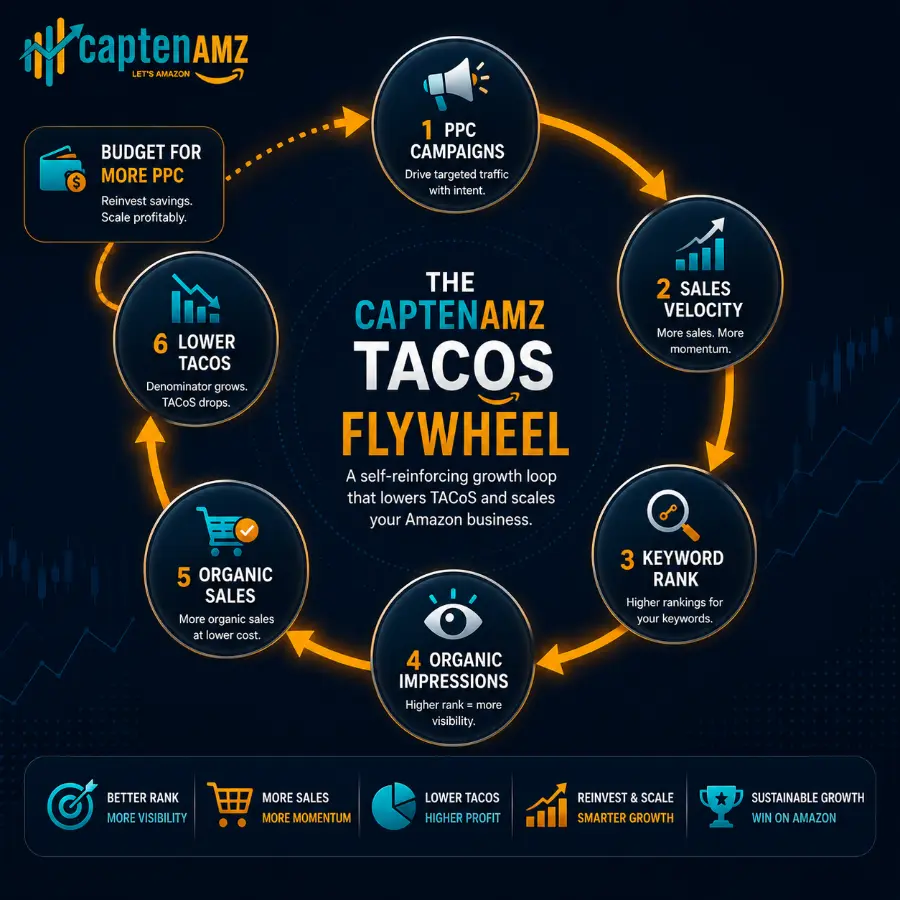
Amazon’s advertising ecosystem is designed to reward sellers who use PPC intelligently as a compounding investment, not as a permanent traffic subsidy. The mechanism works as follows: your Sponsored Products campaigns drive sales velocity for your target keywords. Sustained sales velocity on a keyword improves your organic ranking for that keyword. Higher organic ranking generates organic impressions and organic conversions. Organic conversions add revenue to your total Amazon revenue without increasing your ad spend. That rising organic revenue lowers your TACoS. A lower TACoS means each dollar of ad spend is supporting a larger revenue base, freeing up effective budget to expand into new keywords, new markets, or new product lines — which starts the cycle again.
This flywheel is what separates Amazon businesses that scale profitably from those that stay perpetually dependent on paid traffic. The brands that have built this flywheel successfully are the ones whose TACoS trends consistently downward over rolling 6 and 12-month windows, even as their total ad spend may have remained stable or increased. It is the trajectory of TACoS, not the absolute value, that reveals whether the flywheel is turning.
In 2026, this flywheel has taken on additional significance with Amazon’s Alexa for Shopping AI. Products with strong organic rank and high organic sales velocity are more likely to be surfaced in Alexa shopping recommendations — because Alexa’s recommendation engine uses the same signals Amazon’s organic ranking algorithm uses. A declining TACoS trajectory is, by extension, a signal of increasing AI discovery readiness. Sellers managing their TACoS intelligently are also, without specifically trying to, making their products more discoverable through Amazon’s AI-powered shopping interfaces. This connection between TACoS management and AI search visibility is covered in depth in our Amazon PPC strategy guide for 2026.
How CaptenAMZ Manages TACoS and ACoS Together for USA and UK Amazon Brands
At CaptenAMZ, ACoS and TACoS are never evaluated in isolation from each other, and neither is ever optimized without considering the other. Every campaign decision we make — from bid adjustments and keyword harvesting to budget reallocation and new campaign launches — is evaluated through both lenses simultaneously.
For new product launches and brands in their first 90 days on Amazon, we set deliberate TACoS tolerance ranges that allow the spend investment needed to build organic rank and sales velocity. We explain to every client that a launch-phase TACoS of 18 to 25 percent is not a problem to fix — it is a necessary cost of buying the organic infrastructure that will drive long-term profitability. Cutting that investment prematurely, because the ACoS looks high in Campaign Manager, is one of the most common mistakes we are brought in to correct after sellers have made it on their own.
For established brands with documented organic sales history, we set falling TACoS as the primary strategic KPI and structure all campaign changes — keyword expansion, budget reallocation, Sponsored Brands activation, and dayparting rules — to drive organic sales growth alongside campaign efficiency. Our clients across New Jersey, New York City, Texas, California, the UK, and European Amazon marketplaces receive a monthly TACoS trend report alongside their standard weekly campaign performance reporting.
Our case studies demonstrate this approach in measurable terms. The supplement brand featured in our supplement brand case study saw TACoS reduce from 18 to 9 percent within three months while total revenue increased 6x — the exact profile of the organic flywheel working correctly. The clothing brand in our clothing brand case study reached a stabilized TACoS of 13 percent — a healthy, sustainable level for a competitive apparel category.
If your current account has never been measured through a TACoS lens, or if you are tracking ACoS in isolation and finding that your optimization decisions are not translating into business growth, the starting point is always a full account audit. Our Amazon PPC audit service maps your current ACoS and TACoS positions, identifies the gap between where you are and where your margins and market position suggest you should be, and delivers a specific action plan for bridging that gap within 90 days.
Frequently Asked Questions: Amazon TACoS vs ACoS
What is the difference between Amazon ACoS and TACoS?
ACoS (Advertising Cost of Sales) divides your total ad spend by only the revenue directly attributed to ad clicks. TACoS (Total Advertising Cost of Sales) divides your total ad spend by your total Amazon revenue, including organic sales. ACoS measures how efficiently individual campaigns convert ad spend into ad-driven revenue. TACoS measures how much your entire Amazon business — paid and organic combined — relies on advertising spend. ACoS is a campaign efficiency metric. TACoS is a business health metric. Both matter, but TACoS is the one that reveals whether your advertising is building sustainable organic growth or just generating expensive traffic dependency.
What is a good TACoS for Amazon in 2026?
A good Amazon TACoS depends on your business stage. For new product launches, a TACoS of 15 to 25 percent is typical and expected while you are building organic rank. For growing brands with 10 to 100 reviews, aim for 10 to 18 percent with a consistent downward trend month over month. For established brands with strong organic ranking, 6 to 12 percent is a healthy sustainable range. For mature dominant brands, 3 to 8 percent signals a highly efficient business with strong organic self-sustainability. The most important indicator is not the absolute TACoS number but whether TACoS is trending downward over time as your organic sales grow.
How do I calculate Amazon TACoS?
TACoS = (Total Ad Spend ÷ Total Amazon Revenue) × 100. Get your total ad spend from Seller Central Campaign Manager across all campaign types for a full calendar month. Get your total Amazon revenue from Seller Central Business Reports, specifically the Detail Page Sales and Traffic report — this figure includes both paid and organic sales. Divide spend by total revenue and multiply by 100. Track this number monthly, not weekly. Weekly TACoS has too much natural variation to be useful as a strategic signal. Monthly TACoS shows the true trend of whether your organic sales share is growing or shrinking over time.
Can my ACoS be low while my TACoS is high?
Yes, and this combination is a warning signal that many sellers miss. A falling ACoS paired with a rising TACoS typically means your campaigns are becoming more efficient in isolation, but your organic sales are declining simultaneously. This pattern suggests that organic rank is eroding — possibly because of listing quality issues, competitor activity, or keyword ranking decay. Your total business is becoming more dependent on paid traffic over time, which is the opposite of the self-sustaining flywheel a healthy Amazon brand should be building. When you see this pattern, the correct response is to investigate organic ranking health, not to celebrate the falling ACoS.
Should I cut my Amazon ad spend to lower my TACoS?
No — this is the most common and most costly TACoS mistake Amazon sellers make. Cutting ad spend reduces the numerator of the TACoS formula and makes TACoS appear to improve temporarily. But reduced ad spend collapses the sales velocity that was building your organic keyword rankings. As organic rank decays over the following 60 to 90 days, organic sales fall, total revenue declines, and TACoS spikes back up — often higher than before the cuts. The correct way to lower TACoS is to increase organic sales faster than your ad spend grows. This means optimizing your listing to convert better, building organic rank through strategic PPC velocity, and eliminating wasted spend on non-converting keywords — not reducing overall budget.
Where can I find my TACoS in Amazon Seller Central?
Amazon does not display TACoS natively in Seller Central or Campaign Manager. You calculate it manually from two reports: your total ad spend from Campaign Manager, and your total Amazon revenue from the Business Reports section under Detail Page Sales and Traffic. Some third-party PPC tools such as Helium 10, DataDive, and Perpetua calculate and display TACoS automatically by connecting to both your advertising and business report data. At CaptenAMZ, we build custom TACoS tracking dashboards for every client account as part of our PPC management reporting framework.
Does CaptenAMZ track TACoS for the brands it manages?
Yes. TACoS is a core metric in every CaptenAMZ Amazon PPC management engagement. Every client receives monthly TACoS trend reporting alongside weekly campaign performance data covering ACoS, ROAS, impressions, click-through rate, and conversion rate. We set market-specific TACoS targets based on the client’s product lifecycle stage, category CPC environment, and margin structure. Our TACoS optimization work spans campaign architecture, listing quality improvements, keyword strategy, and catalog health — because all of these factors affect the organic sales denominator that determines TACoS. CaptenAMZ serves Amazon brands across the USA including New Jersey, New York City, Texas, and California, as well as the United Kingdom and European Amazon marketplaces.
ACoS Tells You If Your Campaigns Work. TACoS Tells You If Your Business Is Growing.
In 2026, the sellers building durable, profitable Amazon businesses are not the ones obsessing over daily ACoS movements. They are the ones tracking TACoS month over month and using its trajectory as the primary signal of whether their advertising investment is building a compounding, organic-revenue-growing brand — or simply buying expensive traffic that disappears the moment they reduce their budget.
ACoS has its place. It is the essential daily and weekly lever for campaign-level optimization — bid adjustments, keyword pausing, match type management, and budget pacing. But every decision made at the campaign level should be oriented around moving the monthly TACoS trend in the right direction: downward as organic sales grow, across a rising total revenue baseline. That is the only definition of Amazon advertising success that actually builds a sustainable business.
The five levers that move TACoS in the right direction — listing conversion optimization, organic rank building through PPC velocity, negative keyword discipline, catalog health management, and dayparting strategy — are not PPC tactics in isolation. They are the integrated Amazon growth system that the CaptenAMZ PPC management team applies across every account, every month, for brands competing across the USA, UK, and European Amazon marketplaces.
To go deeper on the metrics and strategies that connect to TACoS management, explore our full library of related guides. Our Amazon ROAS benchmarks guide explains how ROAS, ACoS, and TACoS interact in a complete performance measurement framework. Our ACoS target setting guide shows how to calculate the right ACoS target for your specific margins before any budget decisions are made. Our Amazon PPC strategy guide for 2026 covers the full campaign architecture that drives the organic flywheel TACoS measures. Our Amazon keyword research for PPC guide explains how keyword strategy choices directly affect organic rank and therefore TACoS trajectory. Our Amazon PPC hacks for 2026 includes advanced dayparting and ASIN targeting techniques that accelerate TACoS improvement. And our Sponsored Products vs Sponsored Brands guide shows how budget split decisions between ad types affect TACoS at the portfolio level.
For catalog-side fixes that are silently inflating your TACoS by suppressing organic sales, our Amazon catalog management service, listing optimization service, and A+ Content and Brand Store service address the organic conversion and indexing gaps that no amount of bid optimization can resolve. You can also review our guide to Amazon listing visibility and our variation listing service guide for specific catalog issues that are commonly found to be suppressing organic sales and inflating TACoS without any obvious campaign-level explanation.
CaptenAMZ is based in Trenton, New Jersey, and manages Amazon PPC and catalog performance for brands across the United States — including clients in New Jersey, New York City, Texas, and California — as well as the United Kingdom and European Amazon marketplaces. To get a complete TACoS and ACoS analysis for your account, contact our team or book a free discovery call today. See us on LinkedIn & Instagram.
Ready to Turn Your Amazon Advertising Into a Compounding Growth Engine?
CaptenAMZ manages ACoS and TACoS together — building the organic flywheel that makes your Amazon business less dependent on ad spend every month. Start with a free PPC audit.

Maria R. Donis is an Amazon eCommerce content specialist and digital marketing writer with hands-on experience creating data-driven, SEO-optimized content for Amazon-focused brands. She specializes in producing authoritative content around Amazon PPC management, catalog optimization, listing SEO, and marketplace growth strategies.
Maria collaborates closely with Amazon growth agencies like CaptenAMZ, ensuring that every piece of content reflects real Seller Central experience, platform-specific expertise, and up-to-date Amazon best practices. Her writing is guided by practical insights into how Amazon ads, search algorithms, and buyer behavior work in real-world scenarios.